How To Repair Exchange 2007 Database Conveniently
In Microsoft Exchange Server, Information Store is itscritical component that manages the database. Basically, Exchange Server database is divided into two sections:
- The private Information Store (the priv.edb file) where user mailbox data is stored and managed.
- Thepublic Information Store (the pub.edb file) where data of public folders isstored and managed.
The main job of the information store is to save the database and maintain the transaction so as to render access to mailboxes, the public folders and other services. Another important task that IS of Exchange does is space and buffer management. To ascertain that user actions get recorded on the hard disk of the Server IS works with database engine and MAPI.
The database engine used by Exchange Server is Extensible Storage Engine where database in logical sequence is stored. ESE allows concurrent access over more than one database that also includes the transaction log for system recovery.Any damage to the information store due to reasons like log file corruption, system shutdown, virus attack etc. can leave a user in troublesome situations.
For example: While in an attempt to start up the information store, below mentioned error can be encountered:
"Could not startthe Microsoft Exchange Information Store Service on local computer, Error 1053:The service did not respond to the start or control request in a timely fashion."
This error message might lead to information storedatabase inaccessible. To work aroundthis error message, the following guidelines can be followed:
- Use Eseutil/p repair command. This helps to repair page and table level corruption issues. Meanwhile it should be noticed that it does not help to fix application level corruption.
- Restore unavailable database with the help of backup.If the disaster recovery plan is backup, it is must to check out the state of backup on a regular basis.
Steps to run Eseutil.exe from command prompt:
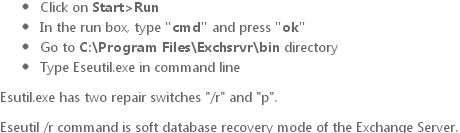
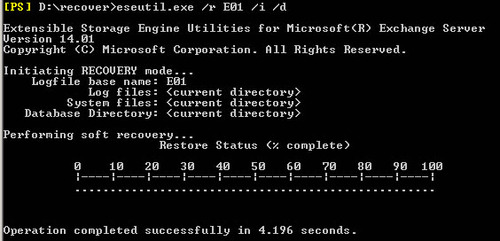
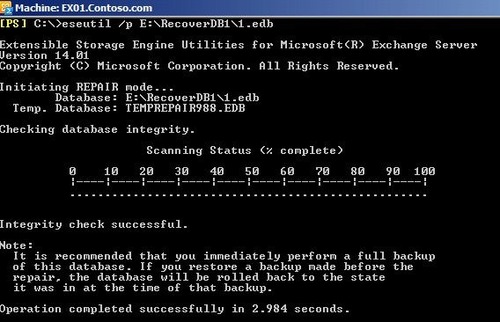
If Exchange EDB database is corrupted, then you can useEseutil/p command line
Eseutil /p C:\Programfiles\Exchsvr\mdbdata\ primary name.EDB
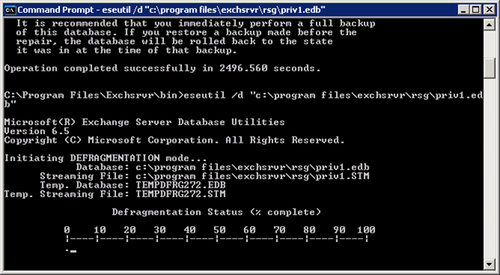
After complete successfully repair Exchange EDB file with Eseutil /P command, run the command to defragment the repair EDB database.
Now run Isinteg.exe utility for intergrity , the utility check of repair EDB database
Isinteg –s {Exchange Server name}-fix-test all tests
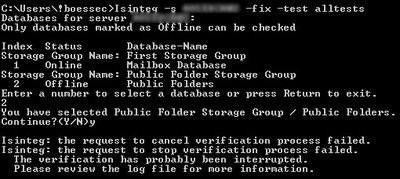
- Choose the repair Exchange database from the Exchange server
- Now Isinteg command line run till no errors are reported on the exchanges server
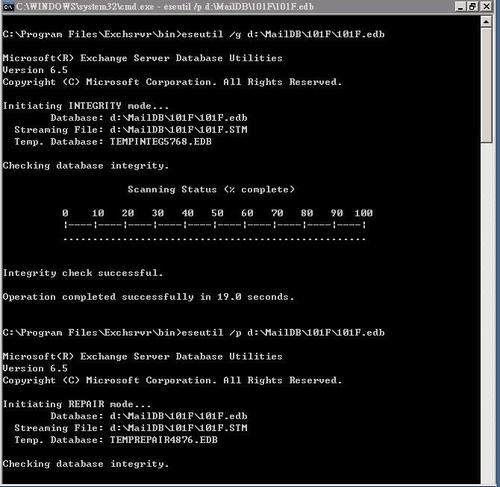
- Now Run the Eseutil \G to check the integrity of repair EDB file
Meanwhile, if both these alternatives fail to retrievethe database, then how to repair Exchange 2007database is the query that strikes an administrators’ mind. However, thesituation mentioned above is just to exemplify what could be the consequence ofExchange database corruption. Like this,there could be other reasons that cause data inaccessibility and thus for afoolproof disaster recovery plan, it is necessary that a solution to handlevaried Exchange related issues is adopted.
Exchange Recovery software is a dependable solutionthat repairs corrupt Exchange database files effectively. The solution recovers damaged EDB files andsaves them to PST file format. With thisEDB converting, users are facilitated with beneficial options like:
- Database from Exchange to Exchange Server can be migrated.
- Exchange database mounting issues can be resolved.
- An EDB file of any size can be recovered flawlessly.
- Works around file, application and table level corruption.
For satisfaction, the freeware of the tool can be downloaded that illustrates the process as how to repair Exchange 2007 database and allows previewing the resulting. For saving the recovered items, investment in complete version of the solution is mandatory.
Repair Exchange 2007 Mailbox when Eseutil and Isinteg Tools Failed
When you are facing EDB corruption issues due to Jet engine error or software cannot be repaired with Eseutil and Isinteg command utility. Therefore,you choose a Thrid party Exchange Recovery Tool. This tool can easily fix EDB corruptionissues of the Exchange server and repair corrupted EDB database within fewminutes.
Visit here: http://www.priv1.edbtopstconvert.org/

